
Claude is not a chatbot. That's what most people get wrong.
If you're still thinking of Claude as "ChatGPT's cousin from Anthropic," you're missing what makes it genuinely different. Most people try Claude once, compare it to ChatGPT, and move on. But that's like comparing a smartphone to a landline by only testing the dialing function.
The real power of Claude lives in how it works with your actual life?your files, your projects, your workflows, your team. And if you're serious about productivity in 2026, understanding this distinction isn't optional anymore.
Stop Thinking of Claude as Just Another Chatbot
Here's what changed: Claude evolved from a conversational AI into a productivity layer. Think of it like the difference between owning a word processor versus owning a personal assistant who understands your entire body of work.
When you open Claude, you're not starting from scratch with every conversation. You're tapping into a system that can remember your style, your standards, your past decisions, and your unique way of working. That's the foundation of why beginners often feel overwhelmed by AI tools?they're taught to use them like search engines instead of like teammates.
The gap between "using Claude" and "using Claude correctly" is enormous. And closing that gap is exactly what this guide does.
The Six Layers of Claude (Ranked by What Actually Matters)
Claude isn't one tool. It's a ecosystem with six distinct parts. Most people only discover the first one and assume they've seen everything.
1. Claude Cowork: Your AI That Lives on Your Computer
This is where the magic starts. Cowork is Claude's desktop application, and it's fundamentally different from the web version. Instead of typing into a text box in isolation, Cowork reads your actual files?documents, spreadsheets, notes, briefs?and understands the context of your work.
Install it by going to claude.com/download. You'll need a Pro account ($20/month, or $17/month annually). After installation, open the Cowork tab and point it to a folder on your computer.
Here's where people change their behavior: instead of becoming a better prompter, you become a better organizer. Create markdown files that contain your writing style guide, brand rules, past examples, and your methodology. Drop them in a folder. Point Claude to it. Now every conversation includes your complete context without you having to rewrite it each time.
This is why prompt engineering guides feel outdated in 2026. The game isn't writing clever prompts anymore. The game is organizing your knowledge properly and letting Claude do the heavy lifting.
Your first Cowork prompt should follow this structure:
"I want to [YOUR TASK] so that [WHAT SUCCESS LOOKS LIKE]. First, read the uploaded files completely before responding. DO NOT start executing yet. Instead, ask me clarifying questions so we can refine the approach together step by step. Only begin work once we've aligned."
The magic word: aligned. You're forcing Claude to ask questions instead of guessing. This creates an interactive form where both you and the AI are building the same understanding of what success looks like. With over 1 million tokens of context window, Claude remembers everything and stops hallucinating because it's working from your actual files, not assumptions.
2. Using the Right Claude Model
Most people use whatever Claude version is default. That's like driving a car with the parking brake on.
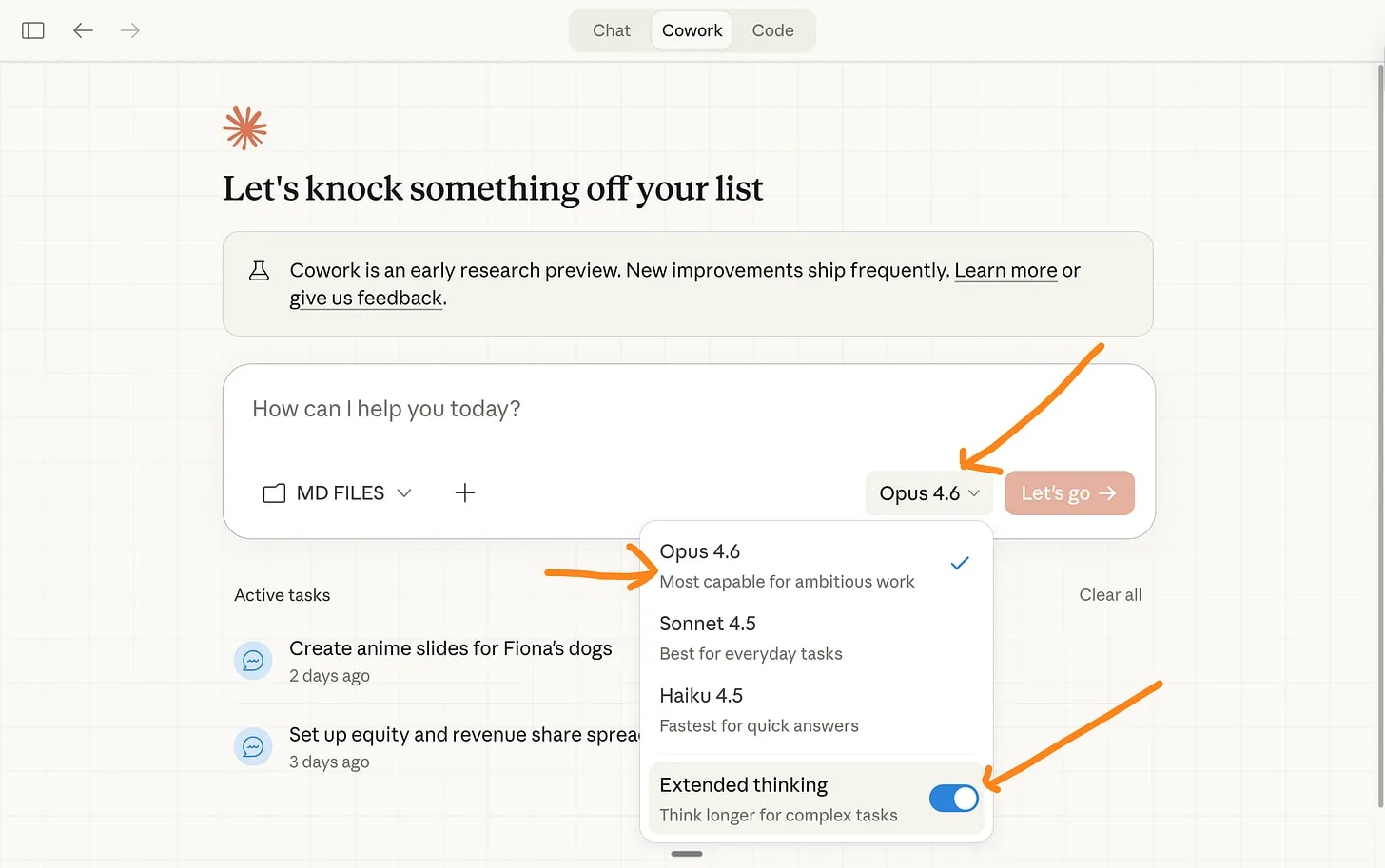
Right now, Opus 4.6 with Extended Thinking is the model you want. It's the smartest available for reasoning, writing, analysis, and planning. But you have to manually select it each time in the dropdown menu at the bottom of your chat.
This distinction matters because different Claude versions handle different tasks differently. Using the wrong one wastes your subscription money and your time. Content creators often don't realize different tools excel at different tasks, and the same applies to different Claude models.
3. Claude Excel: AI Inside Your Spreadsheets
This is Claude living inside your spreadsheets. Instead of switching windows between a spreadsheet and Claude, you call Claude directly from inside Excel. It can read your data, analyze patterns, create formulas, and generate insights without leaving the application.
This saves enormous amounts of time for anyone working with data regularly. Instead of exporting data, opening Claude, asking a question, and copying results back, you just ask Claude directly.
4. Plugins: Turning Claude Into a Specialist
Claude's plugin ecosystem lets you customize it for your specific job. A project manager might add a plugin that connects Claude to their project management tool. A content creator might add one that pulls information from their calendar and CRM.
You're not using generic Claude anymore. You're using Claude configured specifically for your role and workflow. This is why people are building entire businesses using AI without coding?the customization layer makes it possible.
5. Artifacts: Claude Outputs You Can Actually Use
Artifacts are interactive outputs. Instead of Claude writing you code that you have to copy-paste elsewhere, it creates an artifact you can edit, run, and export directly. Instead of writing HTML that you then have to move to your code editor, you can interact with it immediately.
This breaks down the barrier between thinking and doing.
6. Projects: Persistent Context That Remembers Everything
Projects are Claude's memory system. Instead of starting fresh conversations, you create a project folder where Claude stores all your conversations, files, decisions, and context. Everything compounds. The more you use a project, the smarter Claude becomes about your specific work.
Think of it as a persistent assistant who knows your full history, not a chatbot with memory loss.
The Mindset Shift: From Prompting Better to Organizing Smarter
If you're coming from ChatGPT, you probably have a folder of saved prompts you haven't opened in months. You were trained to write longer, cleverer prompts. That was the game.
Claude flipped the game. Now the question isn't "how do I write a better prompt?" It's "how do I organize my knowledge so Claude understands me without prompting?"
Start with your markdown files. Write:
- Your writing style guide (how you actually write)
- Your brand voice (the tone and values you represent)
- Your best past examples (work you're proud of)
- Your methodology (your step-by-step approach to work)
- Your decision-making framework (how you choose between options)
This takes time upfront. But it compounds with every use. After a month, you'll realize you're barely prompting anymore. You're just having conversations with an AI that already knows how you work.
This is why one person can now run operations that used to require entire teams. The AI isn't smarter. You're just using it smarter by organizing your information properly.
Why This Actually Matters
The broader context: AI is no longer a novelty. It's infrastructure. People who learned to use ChatGPT in 2023 and never evolved are now significantly less productive than people who adapted to how AI actually works in 2026.
Even new releases like GPT-5 are focusing on different capabilities, and the playing field continues shifting. If you're still using AI the way you did three years ago, you're leaving massive productivity gains on the table.
The difference between amateur and professional AI usage is this: amateurs treat it like a tool. Professionals treat it like a partner in their workflow. Claude's architecture is designed specifically for that partnership model.
Freelancers are already making the switch for serious work, and there's a reason. Claude's combination of file reading, extended context, and customization makes it fundamentally better at understanding deep, complex work.
Your Next 30 Days
Week 1: Install Cowork. Create three markdown files about your work style, past examples, and methodology. Point Claude to them.
Week 2: Use Cowork for one real project. Force it to ask clarifying questions. See how the output improves when you align properly upfront.
Week 3: Create a Project folder for ongoing work. Start using Opus 4.6 with Extended Thinking for anything requiring reasoning.
Week 4: Explore Excel integration and Artifacts. Start using Claude as an active partner, not a question-answering service.
This isn't about Claude being "better" than ChatGPT in some absolute sense. Different tools excel at different tasks, and your stack should reflect that. But if you're doing knowledge work?writing, analysis, planning, problem-solving?Claude's architecture is specifically built for those workflows.
The people switching aren't doing it because Claude is marginally better. They're switching because they realized they were using AI all wrong, and Claude's design makes the right way feel natural.
Conclusion
Claude isn't a better chatbot. It's a different category entirely. The sooner you stop comparing it to ChatGPT feature-for-feature and start using it as a contextual partner in your workflow, the sooner you'll understand why people are quietly making the switch.
Start with Cowork. Organize your knowledge. Ask Claude for clarity instead of guessing. Everything else flows from there.
If you're serious about productivity in 2026, this matters. Read detailed comparisons of how Claude stacks up against competitors, and then decide based on your actual workflow, not marketing claims. Your 30 days of experimentation will teach you more than any article ever could.
```


💬 0 Comments
+ Leave a comment